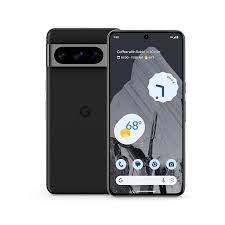
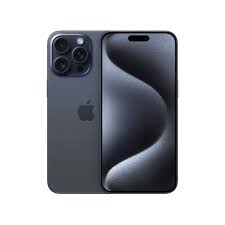
Where these phones stand today
Google announced the Pixel 8 in early October 2023. Apple showed the iPhone 15 a few weeks earlier, in September. They were priced close to each other and aimed at the same person: someone who wants a proper flagship experience without paying for the Pro or Pro Max tier. That is still how most people look at them.
Almost three years later, both companies have released newer phones, so nobody is buying either of these at full launch price anymore. You will find them discounted at shops, sold as refurbished units, or listed second-hand by people who upgraded. That changes the question. It is no longer "which phone was better on launch day". It is "which one is the smarter buy now, with the money I actually have and the accessories I already own".
This page compares the base Pixel 8 with the base iPhone 15. It does not cover the Pixel 8 Pro or the iPhone 15 Pro, which have different screens, chips and cameras. If a shop is offering you a Pro model at a similar price, that is a separate comparison. We build these pages from the official specification sheets, the manufacturers' own update policies and the general experience reported by owners and reviewers. We have not run our own lab measurements for this page, so where a claim depends on how a phone behaves in real life, we say so.
One more thing before the details. Neither phone is a bad choice. If you keep that in mind, the decision gets easier, because the question turns into "what do I lose with each option" instead of "which one is broken".
The specs side by side
Numbers alone do not decide anything, but it helps to see them in one place. Use this table as a reference while you read the sections that follow.
| Feature | Pixel 8 | iPhone 15 |
|---|---|---|
| Released | October 2023 | September 2023 |
| Screen | 6.2 inch OLED, 1080 x 2400 | 6.1 inch OLED, 1179 x 2556 |
| Refresh rate | Up to 120 Hz | 60 Hz |
| Peak brightness | About 2,000 nits | About 2,000 nits outdoors |
| Chip | Google Tensor G3 | Apple A16 Bionic |
| Memory | 8 GB | 6 GB |
| Storage | 128 GB or 256 GB | 128, 256 or 512 GB |
| Rear cameras | 50 MP main, 12 MP ultrawide | 48 MP main, 12 MP ultrawide |
| Front camera | 10.5 MP, fixed focus | 12 MP with autofocus |
| Battery | 4,575 mAh | Around 3,350 mAh (Apple does not publish it) |
| Wired charging | Up to 27 W | Around 20 W class |
| Wireless charging | Qi, up to 18 W | MagSafe up to 15 W, Qi and Qi2 |
| Weight | 187 g | 171 g |
| Water and dust | IP68 | IP68 |
| Port | USB-C, faster data transfer | USB-C, USB 2 speeds |
| Unlocking | Face unlock and in-screen fingerprint | Face ID |
| Update promise | 7 years from launch | No fixed number |
| US launch price | $699 for 128 GB | $799 for 128 GB |
Design, size and weight
Pick both phones up and the first thing you notice is that the iPhone is smaller and lighter. It is about 16 grams lighter than the Pixel and slightly narrower in the hand for one-handed use. The Pixel has a bigger screen, a little more height and a more rounded frame that many people find comfortable. The iPhone 15 also softened its edges compared with the iPhone 14, so the old sharp-corner feel is gone.
Both use an aluminium frame and glass on the back. The Pixel has a horizontal camera bar across the back that looks different from anything Apple makes. The iPhone puts its two lenses in a square block in the corner. Neither layout affects how the phone works, but it does affect how the phone sits on a table. A camera bar tends to make a phone wobble less when it lies flat and you tap the screen, while a corner block can make it rock a little.
Both phones are rated IP68, which means they survive dust and being dropped into water for a short time. That is protection against accidents, not permission to take them swimming. Water damage is normally not covered by the warranty on either phone.
The iPhone 15 added the Dynamic Island, the pill-shaped area at the top that shows timers, music controls and call information. The Pixel 8 has a simple punch-hole camera cut-out and shows notifications in the normal Android way. If you like the Dynamic Island, it is a small but real daily pleasure. If you don't care, you will never miss it.
A practical point: cases. The iPhone has the larger accessory market, and you will find a case for it almost anywhere. Pixel cases exist too, but the choice in a local shop can be thin, and you may end up ordering online. If you care about a specific kind of case, such as a wallet case or a magnetic one, check that it exists for your phone before you commit.
The screen
This is the clearest hardware win for the Pixel 8. Its display can run at up to 120 Hz and adjusts the rate depending on what is on screen. Scrolling through a long web page, flicking through settings or moving around a map looks smoother than it does on the iPhone 15, which is fixed at 60 Hz. The difference is easy to see if you put the two phones next to each other and scroll on both. It is much less obvious if you only ever use one of them.
Apple kept the fast 120 Hz screen for the Pro models. That was a deliberate product decision, not a technical limit, and it still frustrates people who expected it on a phone at this price. If you have used a 120 Hz phone before, you will probably notice the missing smoothness on the iPhone within a day. If you have only used 60 Hz phones, the iPhone will feel normal to you.
On brightness, both companies quote a peak of around 2,000 nits. That figure applies to small bright areas in sunlight, not to the whole screen at once. In practice both phones are easy to read outdoors. Colours are good on both, with the iPhone leaning a little more toward a neutral, calm look and the Pixel showing slightly punchier colours by default. You can change the colour profile on the Pixel in settings if it looks too strong.
The iPhone 15 has a sharper pixel density on paper because its screen is a little smaller with a similar number of pixels. You will not see that at normal viewing distance. Text looks clean on both.
If you read a lot on your phone, scroll social feeds for hours, or play games that support high refresh rates, the Pixel's screen is the better one. If you mostly message, call and take photos, the gap matters much less.
Speed and heat
The iPhone 15 uses the A16 Bionic, the same chip that powered the iPhone 14 Pro. The Pixel 8 uses Google's Tensor G3. In synthetic performance scores the Apple chip is faster, and by a fair margin. Reviewers have said the same thing since launch, and it has not changed with age.
Does that mean the Pixel feels slow? No. For messages, maps, browsing, video calls and most apps, the Pixel 8 is quick enough that you won't be waiting for it. The difference shows up in heavy tasks: long gaming sessions, editing video on the phone, or running several demanding apps in a row. There the iPhone stays fast for longer, while the Pixel is more likely to warm up and slow itself down to control heat.
Heat is the main complaint people have about Tensor chips in general. Google's phones have a reputation for getting warmer than their Apple and Qualcomm rivals when they are under load, for example while charging and navigating at the same time on a summer day. The Tensor G3 improved on earlier versions, but it did not fully remove that reputation. If you live somewhere hot and you use your phone in the car a lot, keep this in mind.
Memory is the other side of the story. The Pixel has 8 GB of RAM and the iPhone has 6 GB. Apple manages memory very tightly, so the smaller number does not hurt it in normal use. Android tends to keep more apps alive in the background, and the extra RAM helps with that. For most people this will not decide anything.
For gaming, the iPhone is the safer choice. Big titles are usually tuned for Apple hardware first, and the chip has plenty of room left. Casual games run well on both phones, so if your gaming is mostly puzzle or card games, it makes no real difference.
Cameras
Cameras are where people argue the most, and where the honest answer is that both are very good and they take different approaches.
Photos in good light
In daylight, both phones produce sharp, pleasant pictures that most people would happily post without editing. The Pixel has long been known for its handling of contrast. It tends to protect the bright sky while still keeping detail in the shadows, and skin tones are a point Google has worked on for years. The iPhone's photos usually look a bit more natural and less processed, with a warm tone that many people like straight out of the camera. Which one you prefer is partly taste. Look at sample photos taken by owners in conditions similar to yours and decide which look you like.
Zoom
Neither phone has a dedicated telephoto lens. The iPhone 15 gets a useful 2x zoom by cropping into its large 48 megapixel sensor, and the results are good. The Pixel 8 uses digital zoom that Google calls Super Res Zoom. It works well at small zoom levels and gets soft as you push further. If you take photos of distant subjects often, such as kids at a school event or a bird in a tree, neither phone is ideal, and a Pro model would serve you better.
Ultrawide and close-up
Both have a 12 megapixel ultrawide lens. The Pixel's ultrawide can focus at short distances, which gives you a macro mode for photographing small objects like flowers and food up close. The iPhone 15 does not have that on the base model. It is a nice extra, though not one you will use every week.
Low light
Google's Night Sight has been a strong feature for years, and it still does a good job on the Pixel 8. Photos of dim streets or indoor scenes come out bright and clean. The iPhone 15's night results improved a lot with the larger main sensor, and in many scenes the two are close. The Pixel sometimes brightens a scene more than it looked in real life, while the iPhone tends to keep the mood of the evening. Again, it depends on what you want.
Video
Here the iPhone has a clear edge and a buyer who cares mostly about video can stop here and pick the iPhone. Video from an iPhone is steady, the colour stays consistent as you move from bright to dark areas, and the microphone picks up voices well. The Pixel 8 records good video too, including 4K at 60 frames per second, but its stabilisation and autofocus are a step behind in many situations. Most video creators who use phones as a main camera choose iPhones for this reason. If you only record short family clips, you will be happy with either.
Front camera
The iPhone 15 has a 12 megapixel front camera with autofocus, which helps a lot for group selfies and for video calls when you hold the phone at odd distances. The Pixel 8 front camera has more limited focus. Both take clear selfies at arm's length.
Editing tools
This is the Pixel's showpiece. Google Photos on a Pixel gives you tools such as Magic Eraser for removing people or objects from the background, Best Take for swapping faces in group shots so that everyone is smiling, and Photo Unblur for rescuing shaky pictures. Some of these tools are also available on other phones through Google Photos, but Pixels usually get them first and for free. Apple's Photos app has its own clean-up tools, but the Pixel offers more choices here and they are easy to reach.
Battery and charging
On paper the Pixel wins clearly. It has a battery of 4,575 mAh against roughly 3,350 mAh in the iPhone 15. Apple does not publish battery capacity, so the iPhone figure comes from regulatory filings and teardown reports.
On paper is the key phrase. Apple's chip is more efficient, so it can do more with less battery. In reviews, the two phones ended up close to each other in mixed daily use, and both usually last a full day for normal users. Heavy users should expect to top up in the evening on either phone. The Pixel's larger cell gives it a small buffer for long days, and you'll notice that most on days when you use the camera and maps a lot.
Battery health over time is a topic that matters for a phone you may keep for years. Both phones let you check battery condition and both companies offer paid battery replacements through their service networks. Apple's network is wider, so replacing an iPhone battery is usually easier to arrange in more places. If you plan to keep the phone for five years or more, a replacement battery at some point is a normal part of ownership and not a sign of a defect.
For charging, the Pixel 8 supports up to 27 W wired, and the iPhone 15 works at around 20 W. Neither box includes a charger. Both come with only a USB-C cable, so you need to buy a power adapter, or use one you already have. Since both phones now use USB-C, a single charger and cable can serve a Pixel, an iPhone, a tablet and many laptops.
Wireless charging is a place where the iPhone has a real advantage. MagSafe attaches a charger magnetically and gives up to 15 W, and the magnets also hold wallets, stands and car mounts. The Pixel 8 supports Qi wireless charging at up to 18 W with Google's own stand, but it has no built-in magnets. You can add a magnetic case to get similar convenience, though it is not the same as having it built in.
The USB-C port on the iPhone 15 transfers data at USB 2 speeds, which is slow. If you copy large videos to a laptop, the Pixel's faster port will save you time. Most people charge their phone through the port and never notice, but heavy file movers will.
Software and updates
The software is the part of the decision that stays with you longest, because you live in it every day. It is worth spending time here.
Update promises
Google promises seven years of operating system and security updates for the Pixel 8, counted from launch. That takes it to the end of the decade. It was a big announcement at the time because Android phones used to get two or three years of support. Seven years is now one of the longest promises in the Android world.
Apple does not give a number. Its track record is good, though: recent iPhones have received major iOS versions for about five to seven years, and the iPhone 15 is fully supported by the current iOS release. So it should keep receiving updates for several more years, though that is an expectation and not a promise. The difference is that Google puts the promise in writing and Apple relies on history. For a buyer who wants certainty, Google's approach is more reassuring. For a buyer who trusts the track record, they are close to equal.
How the two feel to use
Android on the Pixel is close to the version Google designs itself, without heavy additions from a phone maker. It is clean and customisable. You can change your home screen layout, choose different default apps, install alternative keyboards and launchers, and tweak how notifications appear. It suits people who like to set up their phone the way they want.
iOS is more controlled. Things look the same from one iPhone to another, apps are checked by Apple before they appear in the store, and the settings are simpler. It suits people who want the phone to work without much tinkering. It has become more flexible in recent years, with home screen widgets and more control over icons, but it is still a more managed experience than Android.
The AI question
This is a point that separates the two phones in 2026 and it needs to be said plainly. The iPhone 15, the base model, does not support Apple Intelligence. Apple limited those features to the iPhone 15 Pro and newer models, because they need more memory and a stronger chip. So if writing tools, smarter summaries and the newer Siri features matter to you, the base iPhone 15 will not give you those.
The Pixel 8 gets Google's Gemini assistant and features like Circle to Search, which lets you circle something on the screen and search for it. Some on-device AI features arrived on the Pixel 8 through later updates, though the Pro model received a few of them first. If you want AI tools on a phone of this age, the Pixel 8 is in a better position.
How much this matters depends on you. Many owners of both phones never use these tools, and the phones remain very good without them. But if you are curious about them, this is a real point in the Pixel's favour.
Extra features
A few smaller things can tip the decision.
- Emergency features. The iPhone 15 supports Emergency SOS through satellite, which lets you contact emergency services when you have no mobile signal, in the countries where the service is offered. The Pixel 8 does not have satellite features. If you hike, drive long distances alone or travel to remote places, this is worth thinking about, but check that the service works in the country where you live.
- Call tools. Google's Call Screen can answer unknown callers for you and show you a transcript, and it can filter spam calls. It is very useful if you get many unwanted calls. Availability depends on your country, so check before you count on it.
- Unlocking. The Pixel gives you both face unlock and a fingerprint sensor under the screen. The iPhone gives you Face ID only. Face ID is very reliable, but it can be awkward when you wear a mask or sunglasses, or when the phone lies flat on a desk. A fingerprint reader is handy in those cases.
- Storage choices. The iPhone comes in a 512 GB version. The Pixel 8 stops at 256 GB. If you record lots of video, the larger iPhone can save you from managing space all the time.
- Two SIMs. Both phones can use a physical SIM and an eSIM together. Some iPhones sold in the United States have no physical SIM tray at all, which is a problem in countries where carriers do not support eSIM well. See the section on buying outside the big markets for more on this.
Switching from one to the other
Many buyers stay with the platform they already use, and there is nothing wrong with that. But if you are thinking of moving, it helps to know what comes with you and what doesn't.
Contacts, calendars and photos move without much trouble on either side. Both companies offer free tools for transferring data, and you can do it in an evening. Photos are the easiest part if you already back them up to a cloud service. Messaging apps such as WhatsApp and Telegram can move their history between the two systems, though the steps take some care, so read the instructions from the app maker before you wipe the old phone.
What does not move well is the stuff tied to a single ecosystem. iMessage and FaceTime only work on Apple devices, so if you leave the iPhone, your family group chat may turn into a slower, less private one. Apps you paid for on one store must be bought again on the other. Your Apple Watch will not work with a Pixel. Your Pixel Watch or Fitbit will not work with an iPhone in the same way. AirPods will still connect to an Android phone by Bluetooth, but many of the smart features, such as quick switching between devices, will not be there.
If you already own a Mac, an iPad or an Apple Watch, the iPhone 15 fits into that setup in ways the Pixel cannot match. Things like copying text on the phone and pasting it on the Mac, opening a call on the laptop, and sharing photos by AirDrop with someone next to you just work. If you use Windows and Google services, such as Gmail, Google Drive, Maps and Chrome, the Pixel feels natural, and everything you do on it is saved to your account.
A quick test: write down the five apps or services you use most. If four of them work equally well on both phones, choose based on hardware. If two or more depend on one ecosystem, choose that ecosystem.
Price, storage and used units
At launch in the United States, the Pixel 8 cost $699 and the iPhone 15 cost $799, each for 128 GB. That $100 gap made the Pixel look like the better deal on paper, and it came with more memory, a faster screen and a bigger battery. Apple's answer was resale value and long support.
Today the prices you see depend on the shop, the country and the condition of the phone, so we won't quote figures that will be out of date next month. What can be said is how the two behave on the used market. iPhones hold their value better. A two or three year old iPhone usually sells for a larger share of its original price than a Pixel does. That is bad news if you are buying used, because you pay more, and good news if you plan to sell later, because you get more back.
This creates a simple pattern. If you buy new or refurbished and keep the phone for years, the Pixel's lower price is a real saving. If you like to change phones every two or three years and sell the old one, the iPhone can end up costing you less over time, even though it costs more on the first day.
When you buy a used or refurbished phone of either kind, a few checks are worth doing in the shop or as soon as the parcel arrives:
- Look at the battery health screen. On an iPhone it is under Settings, Battery. On a Pixel, look under Settings, Battery. A phone with a clearly worn battery is worth less to you.
- Check that the phone is not locked to a carrier or to someone else's account. An iPhone with an Apple ID still attached, or a Pixel with a Google account still attached, can be useless to you.
- Test both cameras, the speakers, the microphone, the charging port and the fingerprint or Face ID sensor.
- Ask whether the screen or battery has been replaced, and whether the parts were genuine.
- Keep the receipt and write down the serial number or IMEI so that you can prove where the phone came from if there is a problem.
On storage, 128 GB is fine for many people if you use cloud backup and do not keep many videos on the phone. If you shoot video, download offline maps, films and music, or keep years of photos, buy 256 GB. You cannot add memory later on either phone because neither has a card slot.
Buying outside the big markets
Many readers of this site live in places where neither Google nor Apple runs a large local operation. That makes some things more important than the phone itself.
Pixel phones are officially sold in a limited list of countries. In many other places they arrive through importers and small shops, which means the warranty may come from the seller and not from Google. Before you buy, ask who handles repairs, how long the seller's warranty lasts, and whether they can replace the phone if it fails in the first weeks. A fantastic price is not a bargain if nobody will fix it.
iPhones are easier to find, but they can also differ by region. Models made for different countries can have different network bands, and the way the SIM works can change. In particular, iPhones sold in the United States have no physical SIM tray. They use eSIM only. If your local mobile operator does not offer eSIM, that iPhone may not work for you at all. Ask the seller which region the phone was made for, and check the model number against the list on Apple's website.
Do the same for network compatibility on the Pixel. Check that the phone supports the bands your operator uses so that you get good coverage and fast data. A phone that connects but only gets a weak signal in your area is a frustrating purchase.
Payments are another point. Support for contactless payment depends on the country, your bank and the payment app. Confirm that your bank cards and the payment services you use work on the phone you plan to buy. The same goes for banking apps and local government apps, which sometimes are available on one platform first.
Finally, ask about the charger. Because no charger comes in the box, some sellers add a cheap one that does not deliver the speed the phone can accept. A decent 30 W USB-C charger from a known brand is not expensive and is worth buying for either phone.
Who should pick which
The Pixel 8 makes more sense if
- you already use Android and Google services and want to stay there;
- you care about a smooth screen, because you scroll and read a lot;
- you want a written promise of updates that lasts to 2030;
- you enjoy editing photos on the phone and like tools that fix mistakes fast;
- you want to pay less than the iPhone costs and get more memory and battery;
- you like changing settings and making your phone your own.
The iPhone 15 makes more sense if
- you use a Mac, iPad, Apple Watch or AirPods and want them to work together;
- you record a lot of video, or you make videos for social media;
- you want the lighter, more compact phone;
- you play demanding games or you keep your phone for heavy tasks;
- you want MagSafe accessories and the wide range of cases and mounts;
- you plan to sell the phone in a couple of years and want it to keep its value;
- you prefer a simple phone that needs little setup.
If we had to give a single answer for a person with no strong ties to either side, we would say this. For the money, the Pixel 8 offers more on the spec sheet, and the seven-year update promise is a strong reason to pick it. For peace of mind and resale value, the iPhone 15 is the easier choice. Neither answer is wrong.
The one situation where we would push you toward one phone is video. If video matters to you, get the iPhone. The one situation where we would push you the other way is if you want the newest AI tools on a phone this age. In that case, the Pixel 8 is the one that can run them.
Questions people ask
Is the Pixel 8 faster than the iPhone 15?
No. The iPhone 15's A16 chip is faster in performance scores and holds its speed better under heavy work. In everyday use, the Pixel 8 is fast enough that most people will not feel a difference.
Which phone has the better camera?
It depends on what you shoot. The Pixel is very good at still photos and offers more editing tools. The iPhone is better at video and has a stronger front camera. Both take excellent pictures in good light.
Which one lasts longer on a charge?
They are close. The Pixel has a bigger battery, while the iPhone's chip is more efficient. Both normally last a day for typical use. Heavy users should plan to charge in the evening with either phone.
How long will each phone get updates?
Google promises seven years of updates for the Pixel 8 from launch, so until 2030. Apple gives no fixed number for the iPhone 15, but recent iPhones have been supported for about five to seven years.
Does the iPhone 15 have Apple Intelligence?
No. Apple limited those features to the iPhone 15 Pro and newer phones. The base iPhone 15 does not support them.
Can I use AirPods with the Pixel 8?
Yes, they connect over Bluetooth and play sound normally. Some Apple-only features, such as fast switching between Apple devices, will not be available.
Does the Pixel 8 or the iPhone 15 have a charger in the box?
Neither. You get a USB-C cable and need to supply your own power adapter.
Is it a good idea to buy either phone in 2026?
Yes, if the price is right and you are happy with the age. Both are capable phones that will do everyday tasks well for years. Newer models have better chips and cameras, so compare the price gap before deciding.
Which is better for a first smartphone or for older family members?
The iPhone is often easier for people who want a simple, predictable phone. The Pixel is also friendly, and its large screen and fingerprint sensor help some people. If a family member already has an iPhone or an Android phone, use the same system so that you can help them when they get stuck.
Specifications, prices and software policies change. This page was checked against the manufacturers' published information on the date shown above. Confirm the exact model, region and current price with the seller before you pay. Read how we build our pages on the methodology page.