Understanding the Fundamental Split in Consumer Virtual Reality Architecture
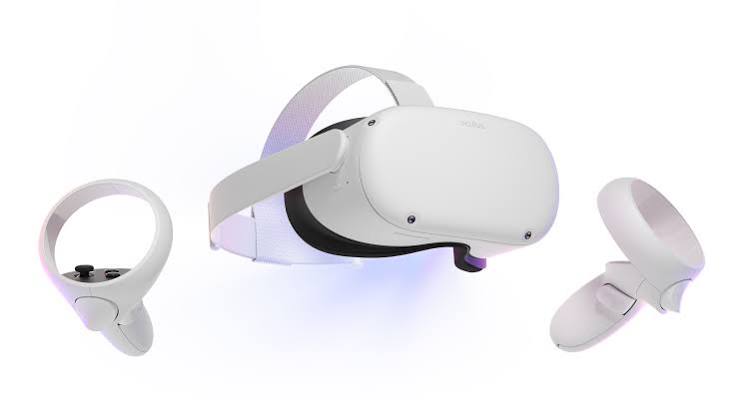
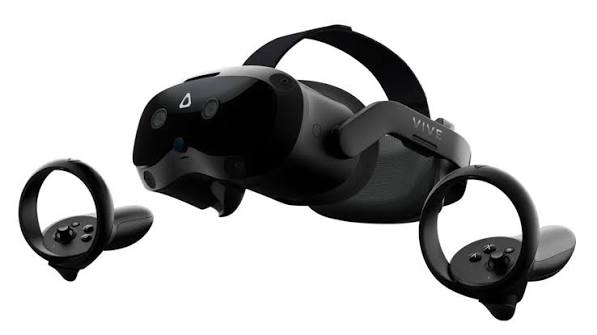
The rise of consumer virtual reality has divided the hardware ecosystem into two clear paths. On one side stands untethered standalone technology, led by devices like the Oculus Quest 2. On the other side are dedicated PC-tethered systems, represented by pioneers like the HTC Vive. Choosing between these options involves much more than comparing raw screen resolution numbers or looking at introductory retail prices. It requires looking closely at how physical spaces, computational engines, tracking precision, and content ecosystems interact to shape a user's experience inside virtual worlds.
Standalone hardware treats virtual reality as an accessible appliance. By packing the processing chips, cooling units, power supply, and tracking sensors directly into the headset frame, devices like the Quest 2 remove the barrier of setup complexity. This convenience makes VR mobile and easy to share with friends, but it comes with engineering trade-offs. Running all components on a limited battery cell requires developers to heavily optimize mobile games, often reducing lighting effects, texture resolutions, and complex physics processing to keep performance smooth.
Tracking Dynamics: Inside-Out Arrays Versus Laser Lighthouse Systems
How a device tracks human movement in a real room is a major differentiator in user experience. The Oculus Quest 2 relies entirely on inside-out tracking. It uses four specialized wide-angle cameras built directly into the front corners of its plastic faceplate to continuously scan your physical room environment. Software algorithms track changes in your room coordinates while monitoring the infrared LEDs on your hand controllers. This design works wonderfully for quick sessions and requires no external accessories, but it has blind spots. If you reach behind your back to pull an arrow from a virtual quiver, or drop your arms too low while looking upward, the headset cameras can lose sight of the controllers, causing small tracking delays.
The HTC Vive takes the opposite approach by using an outside-in laser tracking method known as the Lighthouse system. Users mount two small box-shaped laser base stations on opposite walls or high tripods to flood the play area with invisible infrared signals. Photodiode sensors located across the surface of the Vive headset and controllers catch these timed laser sweeps to calculate physical position down to a sub-millimeter level. Because the tracking signals come from the room corners rather than the headset itself, your body rarely blocks the sensors. This approach delivers rock-solid accuracy, making it the preferred choice for competitive simulators and professional research labs where even tiny tracking errors can break immersion.
Ergonomic Distribution Note
Because standalone headsets must house the processing chip and battery cells within the front housing, they tend to feel front-heavy during long play sessions. Desktop-tethered headsets run cooler on the face because they offload processing heat and heavy battery weight to a remote PC system.
Visual Fidelity, Compression Limits, and Display Panel Quality
When comparing screen resolution specifications on paper, the Oculus Quest 2 appears to beat the older HTC Vive layout with its dense 1832 × 1920 per-eye liquid crystal display matrix. However, raw pixel counts do not tell the full story of visual clarity. When the Quest 2 connects to a computer via an Oculus Link cable or AirLink Wi-Fi connection, the computer must compress the video data into a standard streaming format before sending it to the headset. This compression process can introduce subtle video artifacts, color banding, and small tracking delays in fast-paced competitive games.
The HTC Vive uses lower-resolution dual OLED panels at 1440 × 1600 per eye, but it receives a completely uncompressed, raw video feed directly from your computer's graphics card via a dedicated HDMI or DisplayPort connection. This direct link removes any encoding delay or video compression blur, providing crisp motion handling and deeper black levels thanks to native OLED panel characteristics. For gamers playing high-end racing simulators or dark, atmospheric flight games, the uncompressed data stream and deep contrast of a native PC connection often look cleaner and feel more responsive than compressed, higher-density mobile screens.
Ecosystem Freedom: App Stores vs the Deep PC Open Archive
The software catalog you choose shapes your long-term ownership experience. The Oculus ecosystem works much like a console ecosystem, operating its own curated app store where software is thoroughly tested to run perfectly on mobile chips. This system ensures high performance and reliable framerates for every purchase, but it gives users less control over advanced file adjustments or custom mods. It provides a highly polished experience built for users who want to jump into games without troubleshooting settings.
The HTC Vive relies heavily on the open SteamVR platform, which serves as a massive playground for independent developers, early-access experiments, and community mods. PC gamers can easily customize their graphics settings, add fan-made VR patches to older flat-screen games, and utilize advanced overlay tools to track chat windows or system temperatures while inside virtual environments. The Vive platform offers immense flexibility for power users who enjoy fine-tuning their performance, but it expects users to be comfortable managing driver updates and adjusting performance options when games do not run smoothly out of the box.